

Total Video Player Review: Versatile Mac Media Playback


Read our comprehensive review of Total Video Player HD media player for Mac. Discover its top-tier format support, subtitle options, and smooth playback.
If you have ever struggled to open an uncommon file extension or found your computer running hot during a movie, the Total Video Player HD media player offers a highly efficient, lightweight solution designed specifically for macOS. Developed by etinysoft Inc., this utility functions as a versatile hub for virtually any digital file, DVD, or CD audio you throw at it, eliminating the typical frustrations associated with desktop video playback.
Seamless Codec-Free Playback with Total Video Player HD Media Player
One of the most significant hurdles in desktop entertainment is the constant need to search for and install external video codecs. The Total Video Player HD media player bypasses this hassle entirely. It features native, built-in compatibility for an extensive range of video and audio formats, ensuring you can start watching immediately without background configurations.
- Vast Format Support: Plays everything from HD standards like MP4, MOV, and MKV to legacy files such as AVI, FLV, 3GP, and WMV.
- High-Definition Performance: Optimized to deliver crisp 1080p HD visual quality smoothly, even when handling complex files.
- Hardware Efficiency: Engineered to utilize improved algorithms that prevent your hardware from overheating during extended viewing sessions.
- Audio Versatility: Fully compatible with high-fidelity audio formats including FLAC, MP3, WMA, OGG, and AAC, with support for multi-channel audio devices (including 5.1 and stereo setups).
Advanced Subtitle and Deinterlacing Tools
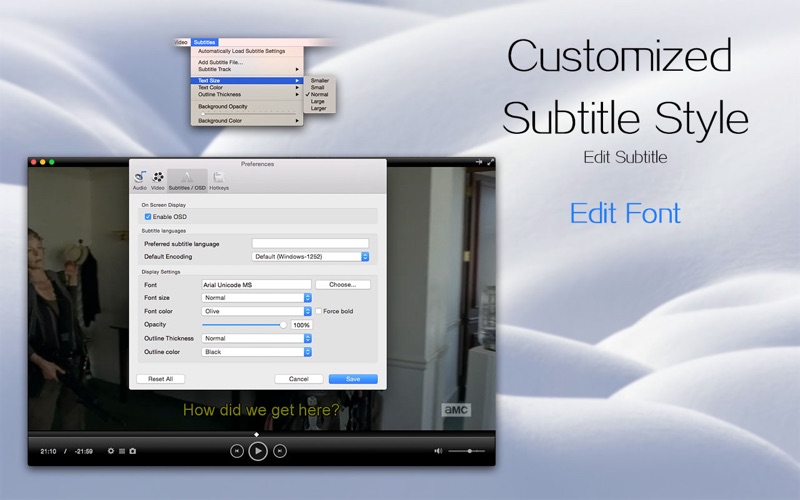
For international film enthusiasts or those studying a second language, subtitle integration is a critical feature. This utility shines by offering comprehensive subtitle management that goes far beyond basic on/off toggles. It automatically loads subtitle files sharing the same name as your video and supports major formats like SubRip (.srt) and Sub Station Alpha (.ssa, .ass).
Users can easily adjust the font style, text size, and color to match their viewing environment. Furthermore, the built-in deinterlacing feature ensures that even older interlaced content (like 1080i media) is rendered with the smooth, progressive look of true 1080p full HD video.
Smart Features Designed for Convenience
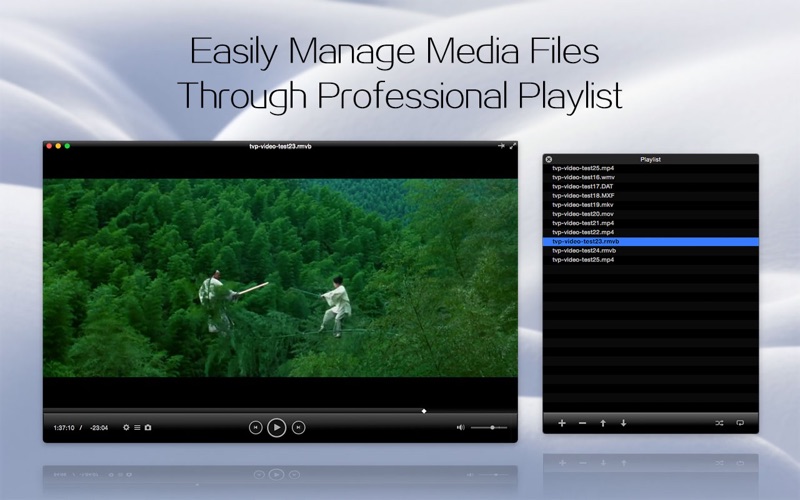
Beyond simple playback, this application integrates several user-centric tools that elevate the daily viewing experience. The intuitive playlist manager allows you to order and loop your media effortlessly, while the screenshot capture tool lets you save high-quality stills of your favorite moments with a single click.
If you use your Mac for multitasking, you will appreciate the pinned screen feature, which keeps the player window locked at the front of your desktop while you work in other applications. Additionally, the unique "A - B Loop" function is perfect for analyzing specific clips, studying video frames, or practicing language pronunciation by repeating segments continuously.
Is It Right for You?
For users seeking a dependable, all-in-one entertainment companion that handles corrupted or incomplete files without breaking a sweat, this application is a stellar choice. It strips away the complexity of modern video playback, delivering a clean, retina-supported interface that prioritizes performance.
To experience this powerful utility firsthand and upgrade your desktop theater setup, head over to the official Mac App Store to get your copy of Total Video Player today.